Content Repurposing
What it is
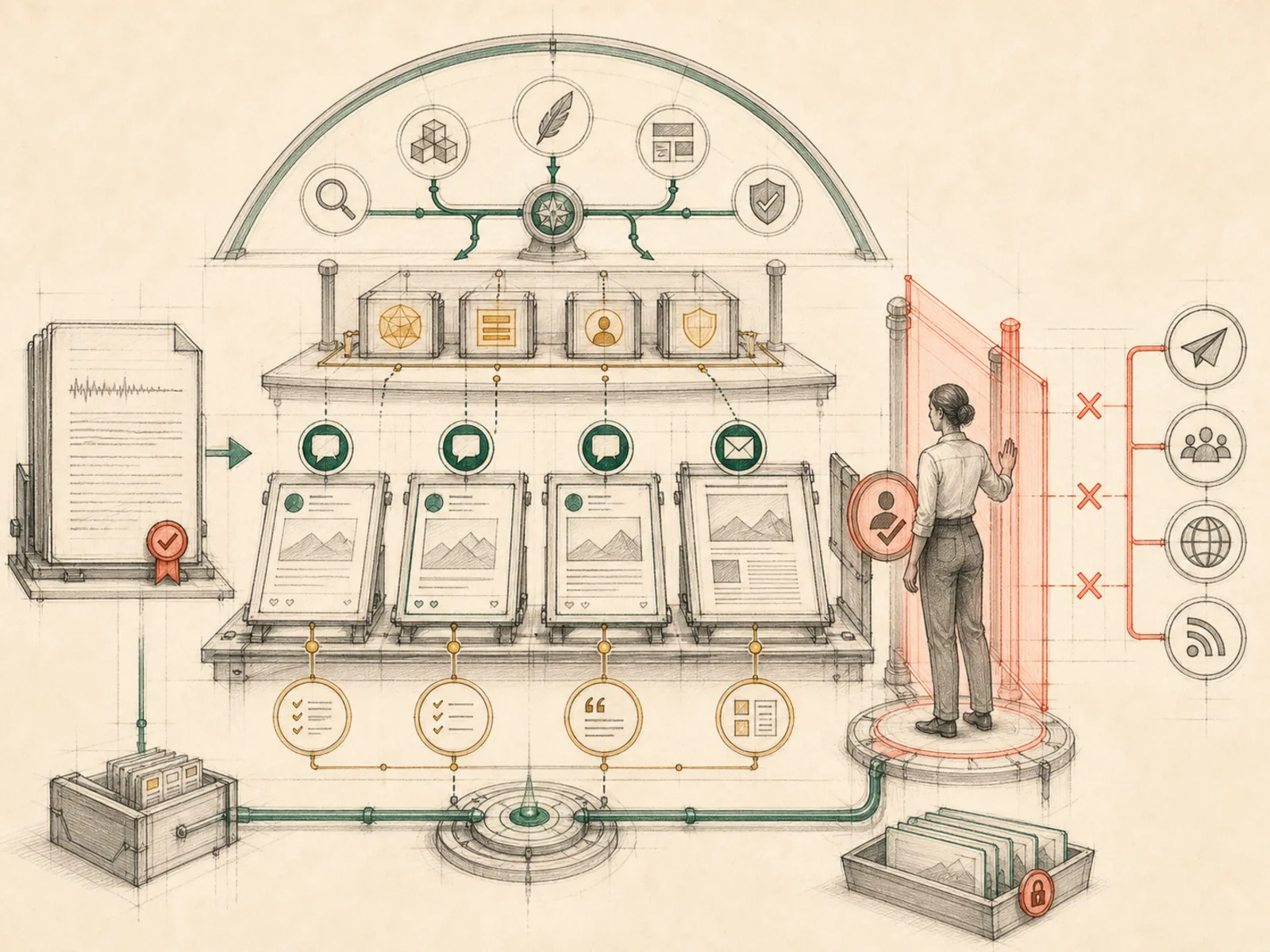
A workflow that transforms approved source material into new formats without publishing automatically.
In plain terms
Think of a print shop that will happily typeset your speech into a poster, a pamphlet, or a business card, but has no delivery van — finished pieces sit on the counter until someone else carries them out the door. Content Repurposing works the same way: it turns one piece of source material into drafts for other formats, then stops, because the tools it has simply cannot publish anything.
Why it matters
The file toolset available to this pattern is exactly four tools — read_file, write_file, patch, search_files — and none of them sends or publishes anything, so a repurposing skill built on it is structurally unable to post regardless of instructions. Turning a script into drafts for X, LinkedIn, or a newsletter stops at a review queue by construction, not because a permission prompt intervenes first (the write path’s own guardrails protect credential files — SSH keys, .env files, token stores — not arbitrary drafts). Publishing becomes a deliberately separate step once a human, or a differently-scoped skill, decides a draft is ready.
How it works
Under the hood this pattern chains ordinary file tools. read_file pulls in the source material — a transcript, an article, a script — with line numbers and pagination for large documents (tools/file_tools.py). If the repurposing job is guided by a saved skill document, instructions covering a specific platform’s tone, length, and format, skill_view loads that skill’s full content before drafting begins (tools/skills_tool.py). write_file then creates a new file holding the repurposed draft, completely replacing anything already at that path rather than editing it in place, while patch handles smaller wording tweaks with fuzzy matching once a reviewer sends notes back. search_files locates existing drafts or source files by content or filename, standing in for grep or ls. None of these four tools has a network call or a ‘send’ action built in, so the chain always terminates at a file on disk.
A concrete example
Someone has a 40-minute podcast transcript saved as a text file and wants it turned into three LinkedIn posts and a short newsletter blurb.
- They point Hermes at the transcript file and ask for the four pieces.
- Hermes reads the transcript with read_file, then writes four new files — linkedin-1.md, linkedin-2.md, linkedin-3.md, and newsletter-blurb.md — each holding a repurposed draft in the right voice and length.
- Nothing gets posted anywhere; the four files just sit in the project folder.
- The person reviews them, asks for a smaller tweak to linkedin-2.md, and Hermes applies it with patch before they copy the final text into LinkedIn themselves.
How it connects
This note belongs to the Workflow Patterns family. Its closest neighboring concepts are: Repo Monitor, Slack Second Brain, Agent Runtime.
Source evidence
vendor/hermes-agent/toolsets.py#<file>— Structural Source Map fallback for toolsets.py. A core source file in the Tool Registry and Toolsets structure within Tools, Toolsets, and MCP.vendor/hermes-agent/toolsets.py#<file>— Structural Source Map fallback for toolsets.py. A core source file in the Tool Registry and Toolsets structure within Tools, Toolsets, and MCP.
Workflows
- Content Repurposing Station
Related articles
- From Zero to a Personal AI Assistant: Building Hermes on a VPS Without Creating a Mess