Computer Use
What it is
Desktop control through a computer-use driver for GUI automation.
In plain terms
Think of remote-desktop software, where someone dials into a machine and drives it exactly as if they were sitting in front of it — moving windows, clicking buttons, typing into fields. That’s the idea here: Hermes can open windows, click buttons, and type into desktop apps directly, for the rare cases where a program has no other way in — no API, no command line, nothing but the graphical screen itself.
Why it matters
Background desktop control through a cua-driver lets the agent operate a GUI application the way a human would, for the cases where no API or browser-automatable path exists at all. It’s a heavier-weight capability than browser tools or terminal tools since it drives an entire desktop rather than a sandboxed page or shell, which is why unattended deployments tend to gate it more tightly through approval boundaries. Cost-aware setups typically leave it off by default and switch it on only for specific, bounded tasks.
How it works
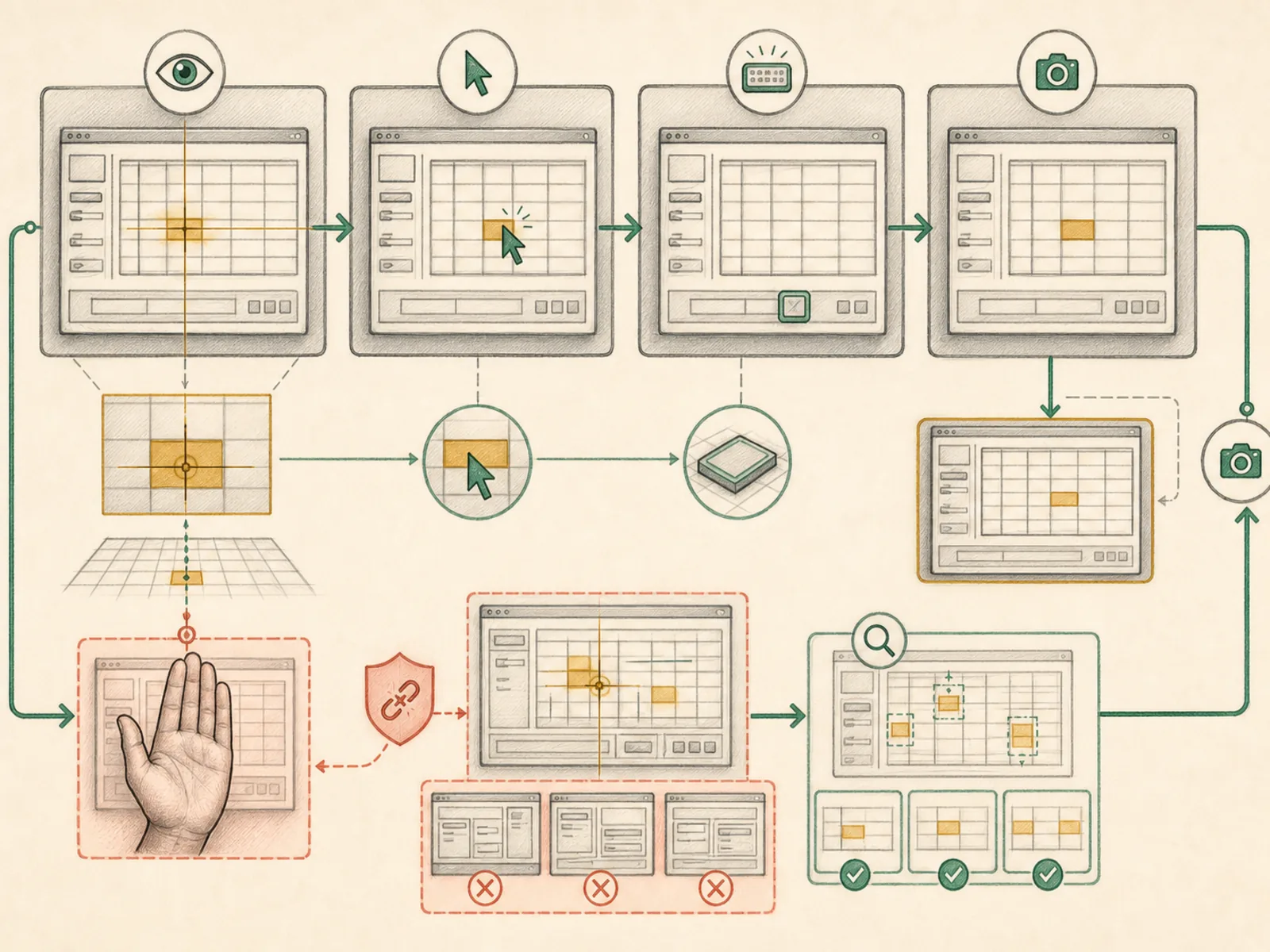
A background driver called cua-driver gives Hermes a single computer_use tool covering macOS, Windows, and Linux, built around one action parameter rather than separate tools per gesture (tools/computer_use/schema.py). Calling it with action=‘capture’ and mode=‘som’ returns a screenshot with numbered overlays on every clickable element plus the underlying accessibility tree, so Hermes clicks by element number instead of guessing pixel coordinates. Read-only actions (capture, wait, list_apps) always run; anything that changes what’s on screen — clicking, typing, dragging, scrolling — routes through an approval callback first (tools/computer_use/tool.py). A fixed blocklist rejects specific dangerous key combinations, like the shortcuts for logging out or emptying the trash, and blocks typed text that pipes a curl download into bash, no matter what approval level is set.
A concrete example
Someone needs a price updated in an old desktop inventory program that has no API.
- Hermes captures the window in ‘som’ mode and gets back a screenshot with numbered fields.
- It clicks the numbered price field, then types the new number.
- Because typing and clicking both count as changes to the screen, each step pauses for approval before it actually fires. Once approved, the field shows the new price — done without anyone opening the app themselves.
How it connects
This note belongs to the Tools family. Its closest neighboring concepts are: Terminal Tools, Code Execution, Agent Runtime, Personal OS.
Source evidence
vendor/hermes-agent/toolsets.py#<file>— Structural Source Map fallback for toolsets.py. A core source file in the Tool Registry and Toolsets structure within Tools, Toolsets, and MCP.
Workflows
- No first-pass workflow mapping yet; this concept still appears in the vault graph through articles and source evidence.
Related articles
- Why Hermes Feels Different: Memory, Self-Improving Skills, and an Agent That Keeps Working
- The Ultimate Beginner’s Guide to Hermes: From First Installation to an AI Operations Team