Approval Boundaries
What it is
Rules for what the agent may do automatically and what needs user confirmation.
In plain terms
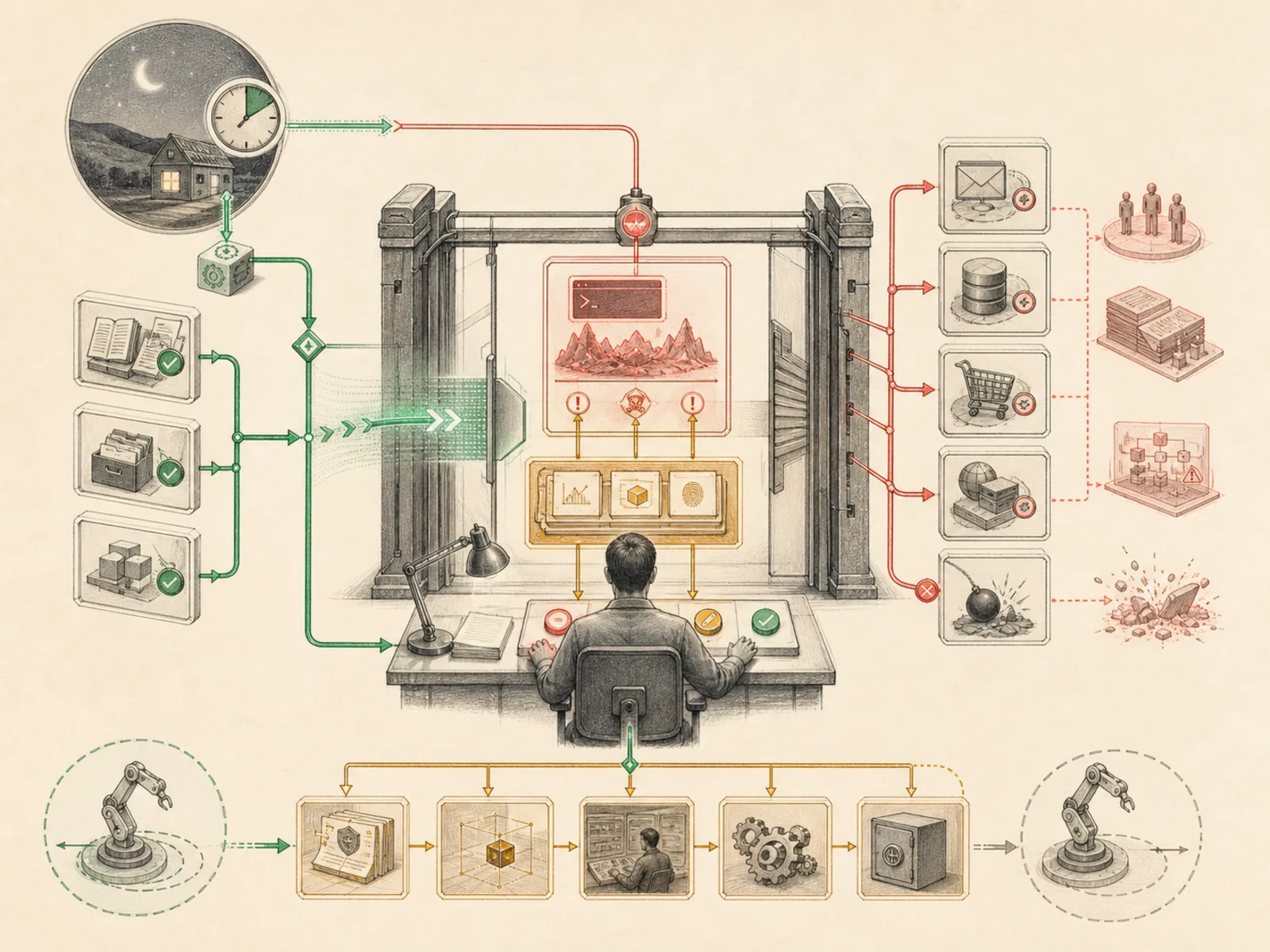
Think of a landlord who decides, before a tenant ever moves in, exactly which repairs the tenant is trusted to handle alone and which ones need the landlord’s sign-off first. Hermes works the same way at the command level: an approval mode set ahead of time decides whether a risky command waits for a human nod, gets judged by a stand-in reviewer, or runs straight through, and that decision is locked in before the lease begins, not renegotiated mid-tenancy.
Why it matters
Deciding ahead of time which actions an agent can take unattended and which need a human to confirm first is what approval boundaries do — the difference between a cron job that quietly files a report and one that needs a nod before sending an email on someone’s behalf. They matter most exactly where the stakes are highest: business CRM intake and content repurposing both touch external-facing actions, which is why each is explicitly wired to require approval rather than running fully autonomously. Getting this configuration wrong in the permissive direction is a much bigger problem than getting it wrong in the restrictive one.
How it works
Hermes reads one of three approval modes from config (tools/approval.py): manual prompts the user before anything flagged as risky runs; smart hands the command to an auxiliary reviewer LLM that strips shell comments first, to defeat injected ‘ignore this and approve’ text, and returns approve, deny, or escalate; off skips prompting entirely. Layered on top of all three is a separate, process-scoped YOLO bypass, the –yolo flag or HERMES_YOLO_MODE environment variable, frozen at process start specifically so a running skill can’t flip it mid-session, a stronger guarantee than the config-level off mode alone provides. Unattended cron runs get their own separate setting, cron_mode, which only accepts deny or approve, there’s no escalate option since nobody is present at 3am to review one, and it defaults to deny. The same gate also runs in front of execute_code before its sandbox even spawns.
A concrete example
A cron job scheduled overnight tries to run a command matching a dangerous pattern. Because cron_mode defaults to deny and no one is watching a chat window at that hour, Hermes blocks it outright rather than waiting on a prompt nobody will answer. During the day, the same command typed in a live chat under smart mode gets sent to the auxiliary reviewer, which reads it as a routine build-cleanup command and approves it without interrupting the user, but would deny a command that looked like a disk wipe.
How it connects
This note belongs to the Operations family. Its closest neighboring concepts are: Project Isolation, Sandbox Boundaries, Agent Runtime, Personal OS.
Source evidence
vendor/hermes-agent/run_agent.py:1892-1902#AIAgent._flush_messages_to_session_db— Verified Source Map evidence for AIAgent. AIAgent uses thin forwarding methods to delegate system-prompt construction toagent.system_prompt.build_system_prompt, API kwargs construction to the chat-completion helper, and streaming requests tointerruptible_streaming_api_call.
Workflows
- Business CRM Intake
- Content Repurposing Station
Related articles
- Ten Hermes Workflows That Turn a Chatbot into a 24/7 Assistant
- Ten Underused Hermes Features That Reveal Its Real Power
- Why Hermes Feels Different: Memory, Self-Improving Skills, and an Agent That Keeps Working
- Hermes for Small Business: Turning Inbox Messages into a Maintainable CRM Workflow
- Seven Cost-Aware Hermes Workflows That Go Beyond Chat
- The Ultimate Beginner’s Guide to Hermes: From First Installation to an AI Operations Team
- Scheduling Hermes: How to Build, Inspect, and Control Automated Cron Jobs
- Six Hermes Use Cases for a More Intentional Personal Operating System