Cron Jobs
What it is
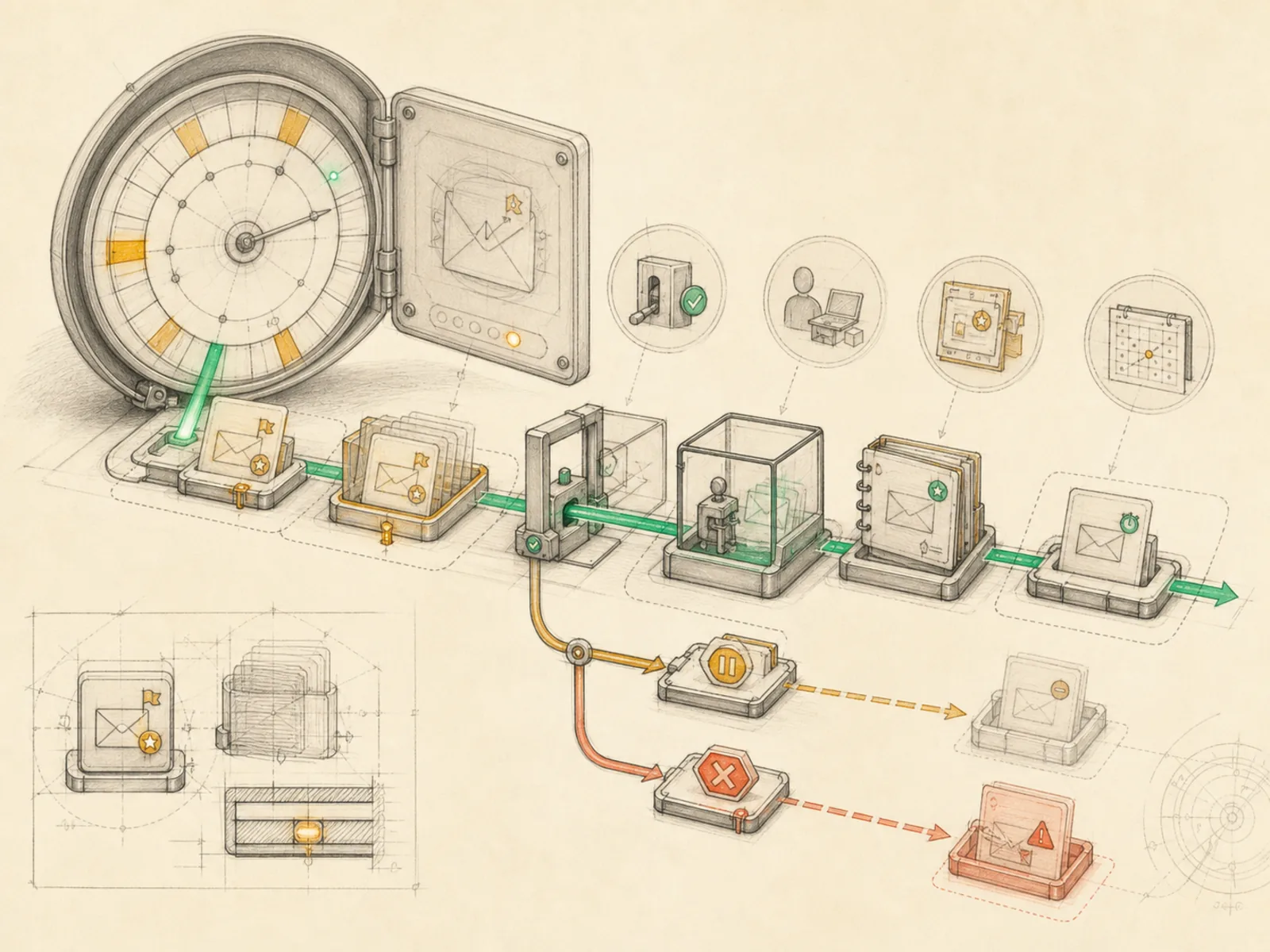
Scheduled agent work that enters the same operational pipeline as manual requests.
In plain terms
Picture handing a trusted staff member a sealed set of instructions to carry out at 3 a.m. while everyone else is asleep — they don’t improvise a shortcut version, they follow the exact same steps a person on duty would follow in daylight. A Hermes cron job is that sealed instruction: a task the agent runs later, unattended, without anyone present to trigger it.
Why it matters
A scheduled trigger doesn’t route through some separate lightweight scheduler — cron jobs enter the exact same conversation loop, turn context construction, and tool execution pipeline a live chat message does. That’s deliberate: a skill built and tested interactively behaves identically once a schedule triggers it later, with no special-cased scheduled-job code path to diverge from. The cronjob toolset backs this with create, list, update, pause, resume, and run operations, optionally with skills attached directly to a job definition.
How it works
Creating a job calls create_job in cron/jobs.py, which parses the schedule string, assigns a random 12-character job ID, computes when it’s next due, and stores the prompt (or attached skills), model and provider overrides, delivery target, and other settings as one record — all reachable through the single “cronjob” tool the agent itself can call (tools/cronjob_tools.py). When a job comes due, cron/scheduler.py’s run_job assembles the prompt via _build_job_prompt and prepends a fixed instruction block reminding the agent it’s running unattended: don’t call send_message, just produce the final answer, and reply exactly “[SILENT]” if there’s nothing worth reporting. Whatever the agent returns then goes to the job’s configured delivery target.
A concrete example
Say someone wants their inbox checked every 30 minutes for anything urgent. They call the cronjob tool with action “create”, schedule “every 30m”, prompt “Check my inbox and flag anything urgent,” and deliver “origin.”
- Every 30 minutes the scheduler finds the job due and runs the full agent loop against that prompt.
- If nothing urgent turned up, the agent’s reply is exactly “[SILENT]” and nothing gets sent.
- If something needs attention, the agent’s summary is delivered straight back into the chat where the job was created.
How it connects
This note belongs to the Automation family. Its closest neighboring concepts are: Pause And Resume, Cron Blueprints, Agent Runtime, Personal OS.
Source evidence
vendor/hermes-agent/toolsets.py#<file>— Structural Source Map fallback for toolsets.py. A core source file in the Tool Registry and Toolsets structure within Tools, Toolsets, and MCP.
Workflows
- Daily Priority Ritual
- Repository Monitor
Related articles
- Inside Hermes: How the Agent Loop, Context, Memory, Gateways, and Cron Jobs Work Together
- Scheduling Hermes: How to Build, Inspect, and Control Automated Cron Jobs
- How to Use Hermes Better Than Most People: Architecture, Project Isolation, and Scalable Workflows
- Building a Personal AI System with Hermes, Local Models, Automation, and a Shared Knowledge Base
- From Zero to a Personal AI Assistant: Building Hermes on a VPS Without Creating a Mess
- Ten Underused Hermes Features That Reveal Its Real Power
- Mastering Hermes Desktop: From Local Chat App to an Always-On Agent Control Center
- Ten Hermes Workflows That Turn a Chatbot into a 24/7 Assistant
- Hermes Agent for Beginners: A Step-by-Step Route from Empty Server to Useful Automation
- Hermes Agent Explained: Why an Agent Harness Matters More Than Another Chat Window
- Hermes for Small Business: Turning Inbox Messages into a Maintainable CRM Workflow
- Seven Cost-Aware Hermes Workflows That Go Beyond Chat
- Hermes Agent 完整入門:打造安全、可持續成長的私人 AI 助理